PoE Camera System Explained Power, Data, and Setup Basics
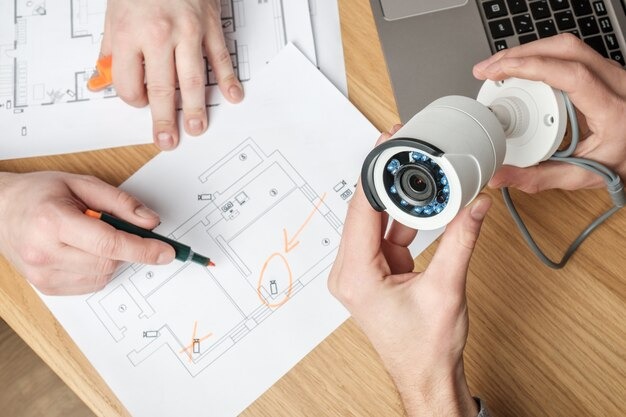
Hey there, tech enthusiasts and small business owners! Are you looking to beef up your security without getting tangled in a mess of wires? Well, you’re in the right place!
Today, we’re diving deep into the world of the PoE camera system. If you’ve ever felt overwhelmed by the thought of setting up surveillance, fear not, PoE is here to simplify your life.
What’s the Big Deal with PoE?
PoE stands for Power over Ethernet. Imagine a single cable that does the job of two. That’s essentially what PoE does for your security cameras. Instead of needing one cable for power and another for data, a PoE camera system uses a single Ethernet cable to transmit both.
Consider the traditional way: you’d have to run power outlets to each camera location and then run separate data cables back to your recorder. It’s a logistical headache, often requiring an electrician and a network specialist.
With PoE technology, you can reduce expenses on wiring, labor, and potential points of failure. This saving makes it an incredibly attractive option for anyone looking into business security camera systems.
How Does PoE Work Its Magic?
The magic behind PoE lies in specially designed network equipment. Here are the key players:
- PoE-enabled Camera:
These are the stars of the show. They’re designed to receive both power and data through that single Ethernet cable.
- PoE Switch or Injector:
This is where the power actually comes from. A PoE switch has built-in ports that can deliver power, while a PoE injector is a standalone device.
You can add this injector to a non-PoE switch to make a single-port PoE-capable switch. The switch or injector essentially “injects” power into the Ethernet cable alongside the data signals.
- Network Video Recorder (NVR) with PoE (Optional but Recommended):
Many NVRs designed for PoE camera systems come with integrated PoE ports. It is the most streamlined setup, as the NVR surveillance system itself provides the power to the cameras and records the footage.
When you connect a PoE camera to a PoE switch (or an NVR with PoE capabilities), the switch intelligently detects the presence of a PoE device and begins supplying power.
Simultaneously, it handles the data transmission for your video feed. It’s a seamless dance between power and data, all on one cable.
Setting Up Your PoE Camera System: The Basics
Setting up a basic PoE camera system is surprisingly user-friendly, especially with an NVR that has built-in PoE ports.
- Plan Your Camera Locations: Decide where you need surveillance. Consider entry points, valuable assets, and blind spots.
- Run Ethernet Cables: It is the “hardest” part, but still simpler than running power and data separately. Measure the distances and run your CAT5e or CAT6 Ethernet cables from your NVR/PoE switch to each camera location.
- Mount Your Cameras: Securely attach your PoE cameras in their designated spots.
- Connect Everything: Plug one end of the Ethernet cable into the camera and the other into a PoE port on your NVR or PoE switch.
- Configure Your NVR: Once connected, most modern NVRs will automatically detect and configure the cameras. You’ll then use the NVR’s interface to set recording schedules, motion detection zones, and viewing preferences.
- Remote Viewing Setup: Connect your NVR to your internet router, and follow the manufacturer’s instructions to set up remote viewing on your smartphone or computer. This lets you check on your property from anywhere!
And just like that, you’ve got a powerful and efficient security system up and running!
Final Thoughts
A PoE camera system is an excellent investment for anyone looking for reliable, high-quality surveillance with a simplified installation process.
Whether you’re securing a small retail store, an office, or even your home, PoE cameras offer a modern, efficient, and scalable solution. Ditch the tangled wires and embrace the simplicity of Power over Ethernet!
FAQs
Do all Ethernet cables work with PoE?
Yes, standard Ethernet cables (CAT5e or CAT6) are designed to work with PoE, as long as the devices on both ends (camera and switch/NVR) are PoE compatible.
Can I mix PoE and non-PoE cameras?
Yes, you can. You’ll just need to ensure your non-PoE cameras have their own power source and are connected to your network. Your NVR/switch will differentiate.
How far can a PoE cable run?
Standard PoE can transmit power and data up to 100 meters (328 feet) without a signal repeater.
Is PoE safe for my network devices?
Absolutely. PoE is designed to be safe. PoE switches only deliver power if they detect a PoE-compatible device, preventing damage to non-PoE equipment.
Do I need the internet for my PoE camera system to record?
No, your PoE camera system will record to the NVR locally even without an internet connection. However, an internet connection is needed for remote viewing and receiving alerts.
Disclaimer
The information provided in this article, “PoE Camera System Explained: Power, Data, and Setup Basics,” is intended for general informational and educational purposes only. While every effort has been made to ensure accuracy and clarity, technology standards, product features, and installation requirements may vary by manufacturer and over time.
This article does not constitute professional electrical, networking, or security advice. Readers are encouraged to consult product manuals, qualified technicians, or licensed professionals before installing or modifying any surveillance or electrical systems. The author and publisher are not responsible for any damage, loss, or safety issues that may result from the use or misuse of the information presented.











Post Comment